

Get rid of the shackles of viewing Pull Request lists only inside repositories. Organizr filters and lists all Pull Requests across the entire Bitbucket instance. Filter by due date, label(s), author, reviewer, state …
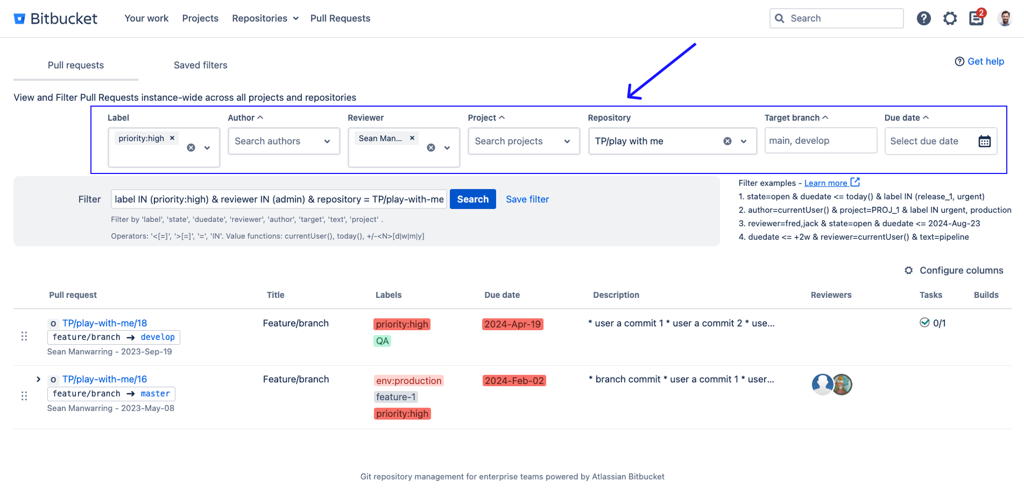
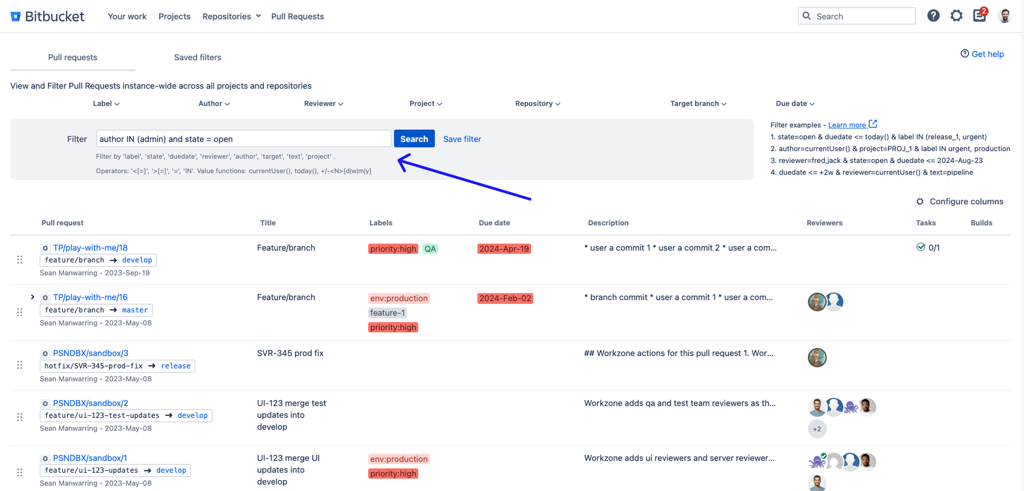
You can choose to filter through boolean search string or select options from the dropdown options, such as Label, Author, Reviewer etc.
Query semantics & operators
Organizr supports a structured filter query syntax with the following operator rules:
&means AND (all conditions must match).- There is no OR operator (no
|). =requires the PR to match all values provided (combined match).- Example:
reviewer = (usera, userb)returns PRs that have bothuseraanduserbas reviewers. - Example:
label = (urgent, release)returns PRs that have both labels applied.
- Example:
INmatches any value in the list (either/or match).- Example:
reviewer IN (usera, userb)returns PRs that have eitheruseraoruserbas a reviewer. - Example:
label IN (urgent, release)returns PRs that have either label applied.
- Example:
- Use quotes for values containing spaces or special characters (e.g.,
text = "annoying client").
UI behavior (selectors):
The Organizr UI selectors always compile multi-selections using IN (because this is usually what users expect). If you need a combined match (e.g., PRs that contain all selected reviewers/labels), you can manually edit the query and change IN to = for that clause.
Common gotcha (reviewers/labels):
- Use
INwhen you mean “any of these reviewers/labels”. - Use
=when you mean “must contain all of these reviewers/labels”.