

Overview #
Workzone provides detailed pull request reviewer and approval configuration rules for each Branch configuration to control which reviewers and groups are added depending on branch and file/module patterns as well as approval quotas to control how many approvals are required before a pull request can be merged.
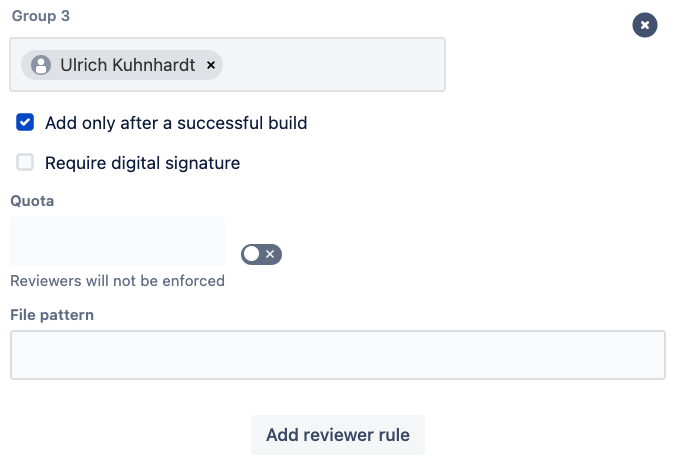
To add a rule click the (1) ‘Add review group’ button.
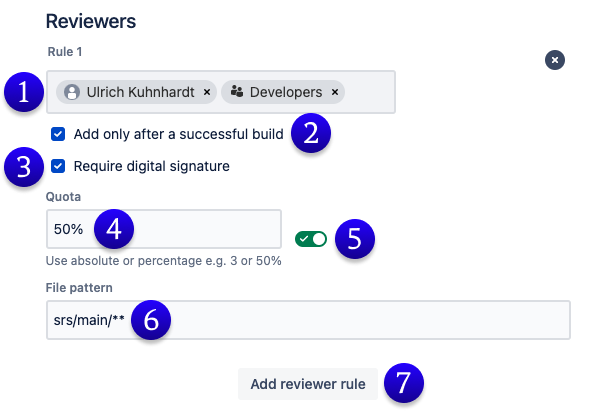
(1) Reviewer users and/or groups: Add users and groups that will be automatically added to a pull request when it is created.
(2) Only after successful build (optional): Some workflows require a successful build for the pull request source branch before the review starts. If this is checked Workzone will not add reviewers to a pull request until a successful build is detected.
(3) Digital Signature: digitally sign pull request approvals with a personal signature token.
(4)Quota: The approval quota required before the pull request can be merged (subject to branch merge conditions). Either a per-cent or absolute count quota must be specified.
If Ignore approvals from committers is enabled in the matching branch configuration, approvals from reviewers who contributed commits to the pull request are excluded from the approval quota calculation.
The approval itself remains visible in Bitbucket, but Workzone does not count it towards the required approval quota. The pull request can only be merged once the quota is met by eligible reviewers who have not contributed commits to the pull request.
(5) Disable quota: If Workzone is not required to control the merge process and should only add reviewers the approval quota can be disabled. Workzone will not count approvals.
(6) File pattern: Specify a module or file path pattern for the reviewer/approval rule. The rule is only applied if the pull request change set has changes that match the pattern.
(7) Add another reviewer rule
Ignoring approvals from committers #
Workzone can be configured to ignore approvals from users who have contributed commits to a pull request.
This setting is useful when your team requires independent review of all code changes before merge. For example, a reviewer may approve a pull request and later add their own commit to the same pull request branch. When Ignore approvals from committers is enabled, that reviewer’s approval remains visible in Bitbucket but is ignored by Workzone when calculating whether the approval quota has been met.
This behaviour applies to Workzone approval quotas. Workzone does not revoke or reset the Bitbucket approval.
Examples #
A fictional project with a mono-repository has 3 main code areas (and groups): UI (ui-devs), server (backend-devs) and test (qa-team). We also have a project manager as well as a release manager. Workzone can easily support the project team with their pull request workflow.
Example Development Team Configuration #
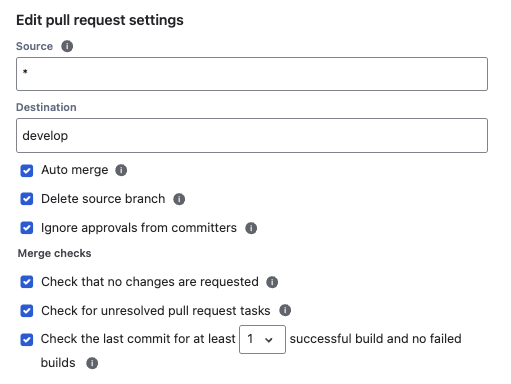
(1) Source branch: ‘*’ – covers an branch for example ‘bugfix/xxx’ or ‘feature/yyy’
(2) Destination branch: ‘develop’ – the shared branch for the development team
(3) Auto-merge: Recommended setting is ‘checked‘ – workzone will merge feature and bugfix branches as soon as merge-conditions are met.
(4) Delete source branch: Recommended setting is ‘checked‘. Depends on the team’s preference.
(5) Ignore approvals from committers: Recommended setting is ‘checked’ when your team requires independent review of pull request changes.
(6) No requested changes: Recommended setting is ‘checked‘.
(7) No unresolved tasks: Recommended setting is ‘checked‘
(8) Successful builds: How many successful and no failed builds are required before the pull request can be merged. Recommended setting: ‘1’
Example reviewer rule #1: #
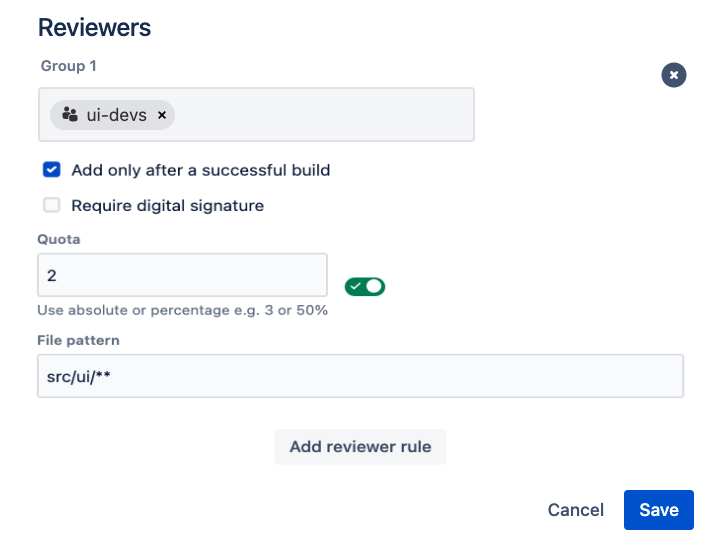
Reviewers: ‘ui-devs’
Quota: 2, at least 2 approvals from ui-devs group, if changes in src/ui/**
File pattern: src/ui/**, only apply this rule if changes in src/ui/** are present in the changeset
Example reviewer rule #2: #
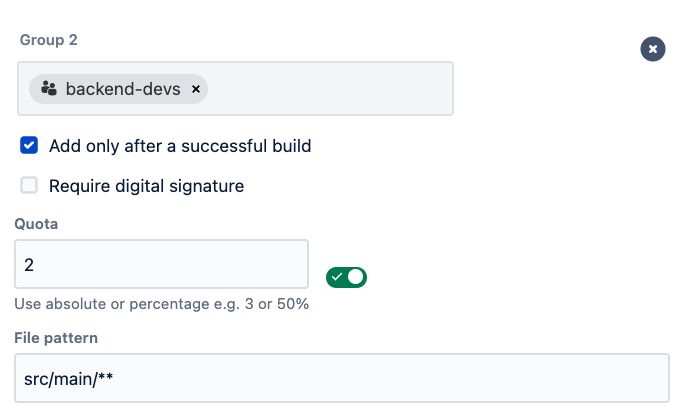
Reviewers: ‘backend-devs’
Quota: 2, at least 2 approvals from backend-devs group, if changes in src/main/**
File pattern: src/main/**, only apply this rule if changes in src/main/** are present in the changeset
Example Reviewer rule #3: #
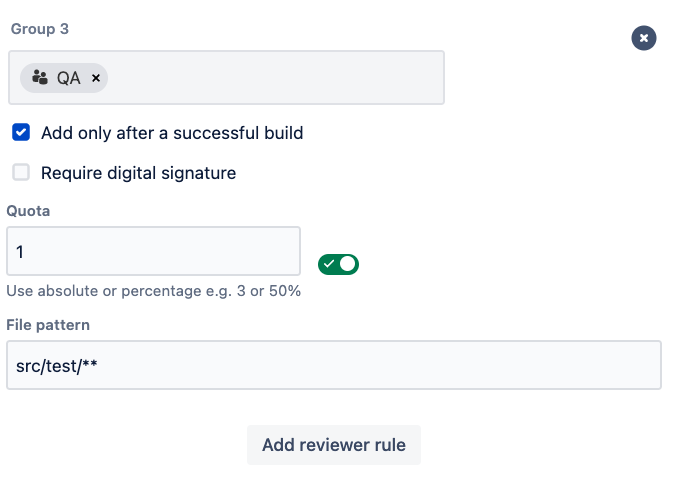
Reviewers: ‘qa-team’
Quota: 1, at least 1 approvals from qa-team group, if changes in src/test/**
File pattern: src/test/**, only apply this rule if changes in src/test/** are present in the changeset
Example Release configuration #
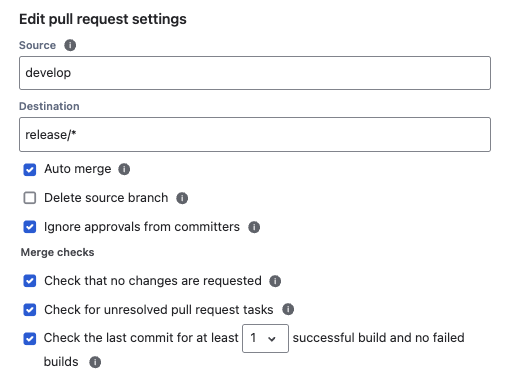
(1) Source branch: ‘develop’
(2) Destination branch: ‘release/*’ – the versioned release branch
(3) Auto-merge: Recommended setting is ‘checked‘ – workzone will merge as soon as merge-conditions are met.
(4) Delete source branch: Recommended setting is ‘unchecked‘. The ‘develop’ branch is long-lived
(5) Ignore approvals from committers: Recommended setting is ‘checked’ when release approvals must be independent from the users who contributed commits to the pull request.
(6) No requested changes: Recommended setting is ‘checked‘.
(7) No unresolved tasks: Recommended setting is ‘checked‘
(8) Successful builds: How many successful and no failed builds are required before the pull request can be merged. Recommended setting: ‘1’
Example Reviewer Rule #1:
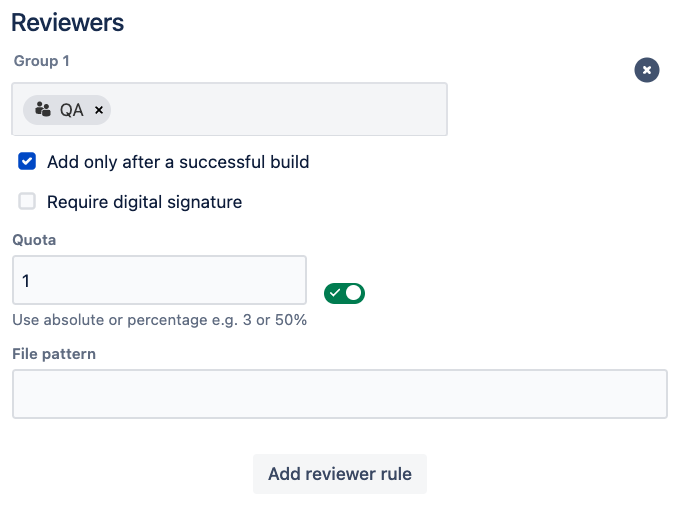
Reviewers: ‘qa-team’
Quota: 1, at least 1 approval from QA to acknowledge all manual tests are passing
File pattern: leave blank
#
Example Reviewer Rule #2: #
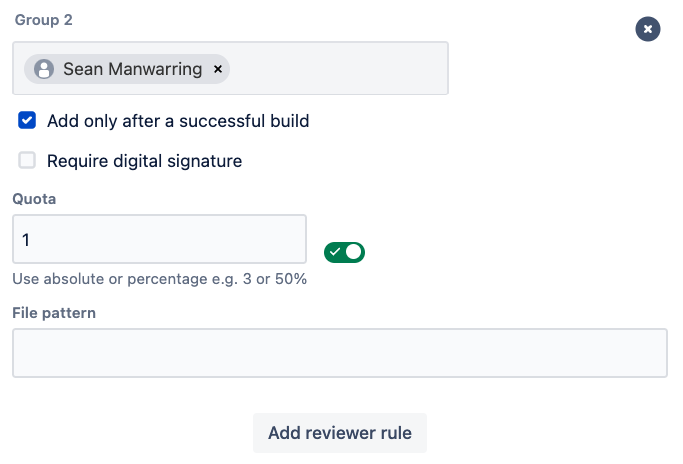
Reviewers: ‘Release Manager’, notify the release manager of the upcoming release merge
Quota: 1, mandatory approval from the release manager
File pattern: leave blank
Example Reviewer rule #3: #
Reviewers: ‘Project Manager’, notify the project manager of the upcoming release merge
Quota: disabled, the project manager only needs a notification but no need to approve
File pattern: leave blank