

Scaling Bitbucket for Large Teams: Best Practices and Tips
Scaling Bitbucket for Large Teams: Best Practices and Tips
Introduction
Scaling Bitbucket for a large team is about more than adding users and repositories. As teams grow, the challenge is maintaining clear ownership, consistent access controls, efficient pull request reviews and reliable builds—without turning every change into an administrative exercise.
Bitbucket provides Git repository hosting, pull requests and integrations with development tools. The right setup depends on whether you use Bitbucket Cloud or Bitbucket Data Center, how many teams and repositories you manage, and where collaboration or performance is becoming a bottleneck.
Below are practical ways to scale the workflow and the repositories themselves.
Assess Your Team’s Needs and Choose the Right Bitbucket Deployment
Before changing configurations or purchasing apps, establish what actually needs to scale:
- People and ownership: How many teams, external contributors and approvers need access? Who owns each repository and critical code area?
- Governance: Which branches need restricted access, required reviews, or evidence of approval?
- Delivery: Are slow builds, long review queues or unclear release dependencies causing delays?
- Repository health: Are large binary files, long Git histories or excessive clone times affecting developers?
- Administration: Can settings and permissions be managed consistently without duplicating them across dozens of repositories?
Bitbucket Cloud currently offers Free, Standard and Premium plans—not a separate general-purpose “Enterprise” Cloud plan as the original version of this article suggested. Choose based on the features, scale and administration requirements you actually need. For example, Premium can enforce supported native merge checks, whereas on lower plans many native checks are advisory. Review the current Bitbucket plans rather than relying on old prices or feature comparisons.
Bitbucket Data Center is a separate self-managed deployment, with different administration and CI/CD arrangements. Importantly, Bitbucket and Bamboo Data Center are excluded from Atlassian’s general 2029 Data Center end-of-life timeline; existing customers should still review the evolving Bitbucket hybrid licensing arrangements.
Setting Up Bitbucket for a Large Team
Organise projects and repositories around ownership
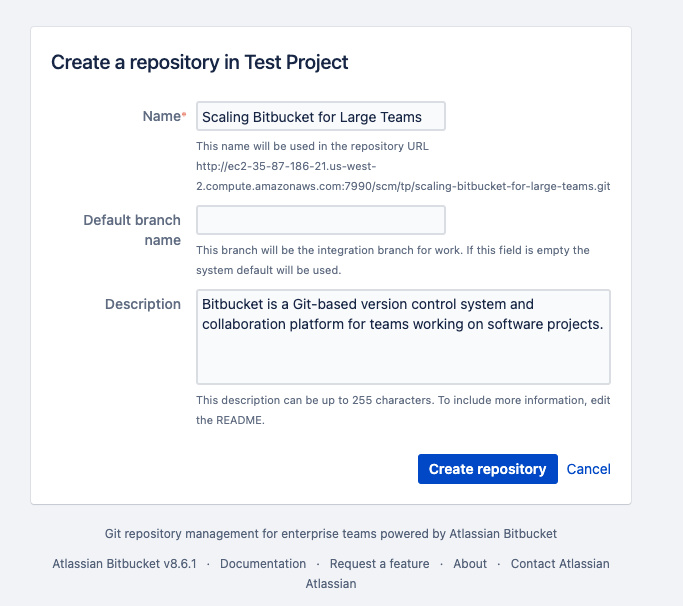
Group related repositories into projects so access policies and administration are easier to understand. Avoid creating a separate repository simply because a new person or feature exists; choose repository boundaries based on ownership, release independence, access requirements and how the code is actually developed.
Give repositories and branches recognisable names, assign maintainers, and document where shared libraries or cross-team dependencies belong. This can reduce confusion as contractors, new employees and remote teams join the work.
Set consistent access controls and branch restrictions
Manage repository access through appropriate user groups and project/repository permissions. Apply the principle of least privilege, review external-contractor access regularly and protect key branches from unintended direct changes.
For Bitbucket Cloud, project-level branch restrictions can apply consistent rules across repositories in a project. They can control who may write or merge to specific branches and work alongside merge checks.
Data Center has its own project, repository and branch permission controls, so its setup screens and enforcement options should be checked separately.
Permissions answer who is allowed to act. Reviewer and merge policies answer what must happen before a change is accepted. Both matter as teams grow.
Integrate Jira, communication and code-quality feedback
Connect Bitbucket with the tools your teams already use. Jira can provide context for branches, commits and pull requests; Slack or other messaging integrations can surface relevant events without requiring everyone to watch every repository.
Bitbucket Code Insights can display build, test, security-scan or static-analysis reports from connected tools in pull requests. It does not independently measure developer motivation or run those analyses for you.
If your team uses Jira Smart Commits, remember that their purpose is to perform configured Jira actions such as commenting, logging time or transitioning work items from commit-message commands—not to make Git pushes or CI jobs unnecessary.
Best Practices for Collaboration, Reviews and Branches
Define a repeatable review and merge process
When hundreds of developers contribute to many repositories, unclear review ownership becomes a real bottleneck. Set basic expectations for pull request size, descriptions, review turnaround, branch naming and what happens when code changes after an approval.
In Bitbucket Cloud, native CODEOWNERS can assign reviewers based on changed paths, including individuals, workspace groups and repository-managed teams.
Native default reviewers and merge checks cover many routine workflows. On Premium, supported merge checks can be enforced as blocking conditions.
The right goal is not to require two people to inspect every line of every change. Match the review to its risk: a documentation update may need a lightweight review, while an authentication or payments change may warrant approval from a specific team.
Keep feature branches reasonably short-lived, avoid excessive work-in-progress and make reviewers easy to identify.
For an introduction to the mechanics, see our beginner’s guide to Bitbucket pull requests rather than repeating the entire tutorial here.
Give teams a way to find and prioritise work
As pull request volume increases, teams need more than notifications. Agree on how to identify PRs waiting for review, blocked by checks, nearing a release deadline or dependent on other changes.
Avoid confusing Git tags and branch names with pull request labels—they solve different problems.
For Bitbucket Data Center, Izymes’ Organizr adds PR labels and due dates, an instance-wide filtered PR view and merge dependencies. This is especially useful when many teams are coordinating releases across repositories.
Cloud and Data Center have different native PR discovery options, so assess the gap in your actual environment first.
Use CI/CD and Automation Without Creating New Bottlenecks
Automated builds and tests can catch repeatable errors earlier, but a passing pipeline does not guarantee bug-free or secure code.
Decide which fast checks should run on every PR and which more expensive integration, performance or security tests belong later in the delivery process.
The hosting distinction matters here:
- Bitbucket Cloud provides Bitbucket Pipelines for CI/CD, with usage and concurrency depending on the plan and runner setup.
- Bitbucket Data Center integrates with CI servers such as Bamboo or Jenkins; it does not include Bitbucket Cloud Pipelines as a native Data Center feature.
At scale, watch build duration, queue time, flaky tests and resource consumption. A slow CI system can delay every review; adding more mandatory jobs is not automatically an improvement.
Use merge checks to reflect your actual policy, and keep deployment approvals and environments separate from the simple act of merging code.
Advanced Tips for Repository Performance and Efficiency
Manage large repositories and binary files
Separate repository performance problems from PR administration problems.
Closing old PRs or deleting merged branches can reduce clutter, but it does not automatically shrink Git history or make a large clone faster.
For repositories containing sizeable media, compiled artifacts or other binaries, consider Git Large File Storage (LFS) rather than committing large binary content directly to Git.
For Bitbucket Cloud, Atlassian recommends keeping repositories under 2 GB and documents a default 4 GB repository limit for Standard/Premium; limits and exceptions should be checked before making capacity decisions. See current limits and reduction guidance.
Track clone/fetch duration, repository growth, build artifacts and the effect of large changesets.
If a repo is already oversized, develop a carefully tested cleanup or migration plan—rewriting published Git history can disrupt other contributors.
Extend Bitbucket where the native workflow stops being enough
Bitbucket is not an open-source product, although Git is open source and Bitbucket supports integrations and Marketplace apps.
Start with native capabilities; add apps when they solve a specific operational problem.
For the Izymes team, this is our bread and butter:
- Workzone for Bitbucket (Cloud and Data Center) helps apply detailed reviewer and approval rules—for example, file/path-specific reviewer groups, approval quotas and configurable merge conditions. For Cloud, enforcing the intended Workzone-controlled merge path also requires appropriate Bitbucket branch restrictions.
- Organizr for Bitbucket Data Center helps teams search and filter PRs across an instance, manage labels/due dates and coordinate merge dependencies. Its current search uses Bitbucket’s native search API rather than the older Elasticsearch/OpenSearch dependency.
- Reminders for Bitbucket Data Center can notify reviewers and stakeholders about overdue PR reviews and approvals.
They address different scaling problems.
A small team with straightforward reviews may not need them; a large team struggling with complex approval rules, scattered PR work or stale review requests may benefit.
What Should a Large Bitbucket Team Measure?
If the goal is scaling effectively, track a few signals before and after changing the workflow: how long PRs wait for their first review, how many remain stale, whether required approvals come from the right teams, build queue and failure rates, and repository size or clone time.
Look for bottlenecks rather than treating activity counts as productivity scores.
A team that opens more PRs is not automatically delivering better software, and adding more reviewers does not automatically improve quality.
Conclusion: Scale the Workflow as Carefully as the Repositories
Scaling Bitbucket requires clear repository ownership, consistent permissions, thoughtful review rules, reliable CI/CD and a realistic plan for large Git repositories.
Start with native Bitbucket features and strengthen the areas where coordination becomes difficult. Revisit the setup as teams, projects and delivery needs evolve.
Ready to make your Bitbucket workflow easier to manage at scale?
If your bottleneck is reviewer assignment or merge governance, explore Workzone on the Atlassian Marketplace.
For Bitbucket Data Center teams managing PRs across many repositories, see Organizr; if overdue reviews are slowing delivery, see Reminders for Bitbucket.
Each app addresses a different part of the scaling challenge.
By Sean Manwarring, Head of Marketing at Izymes
Published 5 January 2023 · Updated 26 October 2026