
Improving Support Desk Quality with Automated Sentiment Analysis
Improving Support Desk Quality with Automated Sentiment Analysis
Are you finding it difficult to maintain high levels of customer satisfaction in your support desk? Automated sentiment analysis for support desks can help teams identify signs of frustration or satisfaction in customer conversations, spot trends across requests and intervene before a problem escalates.
The important distinction is that sentiment analysis provides an additional signal, not a definitive measurement of customer satisfaction. Used alongside customer feedback, service-level data and human judgement, it can help teams understand the experience behind a support ticket—not just whether the ticket was closed.
2026 product update: AI Insights for Jira Service Management has been migrating from Atlassian Connect to Forge, with a new Atlassian-hosted AI processing model replacing IBM Watson. After the Forge upgrade, projects that previously had sentiment analysis enabled need a Project Admin to re-enable it and accept the updated processing terms before new sentiment analysis resumes. See the AI Insights Forge migration guide for the current instructions.
What Is Automated Sentiment Analysis in a Support Desk?
Automated sentiment analysis uses AI to interpret the emotional tone of text, such as issue descriptions and customer–agent comments. It can highlight language associated with satisfaction, frustration, disappointment or other sentiments, helping teams notice changes across a conversation or support project.
For Jira Service Management teams, the aim is to recognise a potentially unhappy customer while there is still time to help, rather than relying solely on a satisfaction survey after the request is resolved.
That does not make surveys obsolete. Jira Service Management already includes customer satisfaction (CSAT) surveys that invite customers to rate completed requests.
Sentiment analysis is different: it estimates tone from the conversation rather than asking the customer how satisfied they are. An inferred sentiment score should not be represented as a directly reported CSAT rating.
How Sentiment Analysis Can Improve Support Desk Quality
The most useful applications are practical rather than theoretical:
- Spot potential dissatisfaction earlier. A customer who becomes increasingly frustrated may need a clearer update, a different explanation or escalation to the right specialist.
- See patterns beyond individual tickets. Changes in sentiment across a project can draw attention to recurring friction or an area worth investigating.
- Make reviews more informed. Managers can use sentiment trends alongside resolution time, SLA performance and direct customer feedback when deciding what to improve.
- Support better conversations. Agents can examine what prompted a negative reaction and adjust their response—without assuming the AI interpretation is always right.
These are opportunities to improve service, not guarantees of higher retention, better CSAT scores or faster resolution times.
How AI Insights Works in Jira Service Management
AI Insights for Jira Service Management is an Izymes app for Jira Service Management Cloud that analyses customer and agent interactions within JSM issues.
Its documented features include:
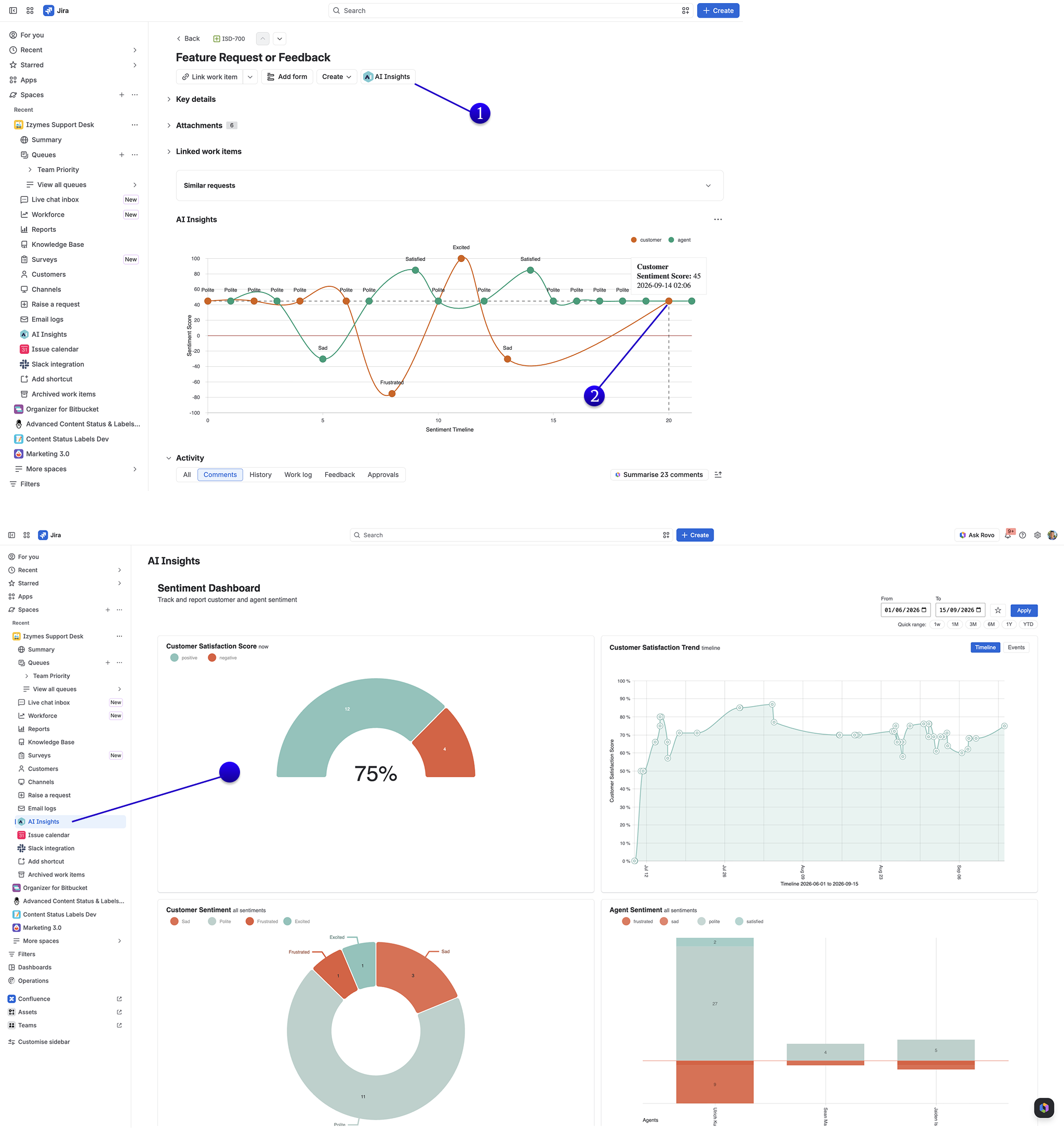
- Issue-level sentiment timelines. The AI Insights issue panel shows sentiment associated with issue summaries and comments, helping agents see how the conversation has developed. Not every comment will necessarily produce a detectable sentiment.
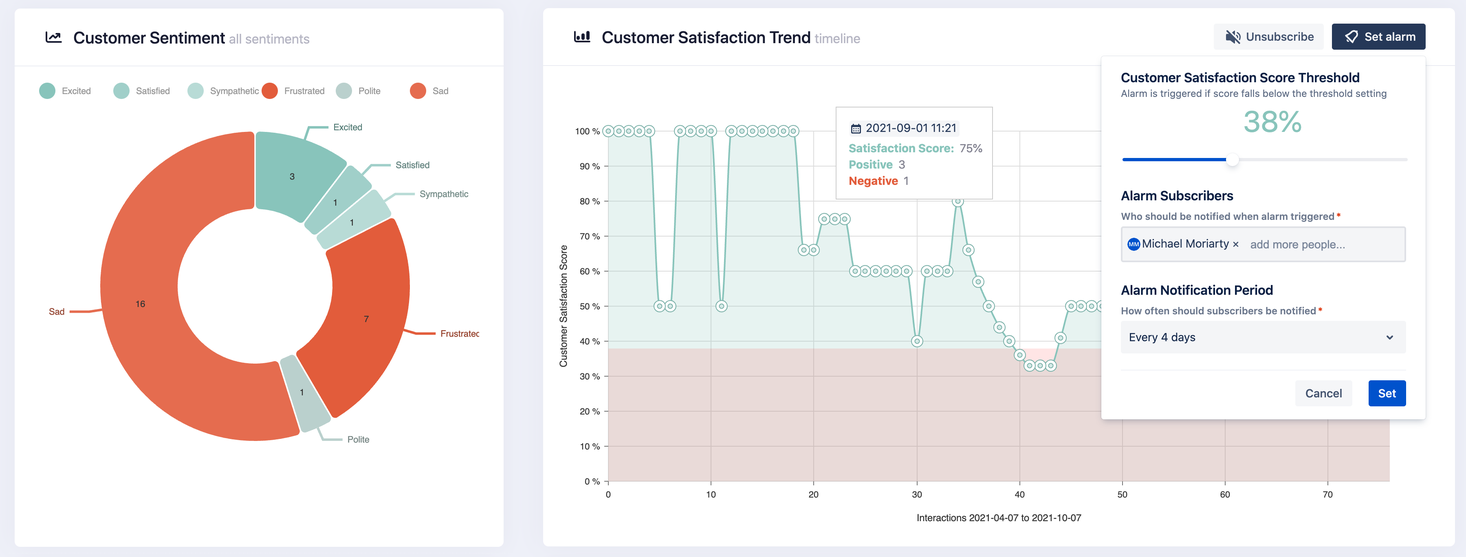
- Project-level trends. The Project Insights view brings together customer sentiment indicators and trends across the project, with ways to investigate the issues behind the results.
- Filtering and dashboards. A customer sentiment field can be used in Jira filters and dashboard gadgets, giving teams another way to identify requests worth reviewing.
- Agent sentiment tracking. AI Insights can also analyse agent communications, subject to your organisation’s permissions and privacy choices.
A Practical Example: From Signal to Better Support
Imagine a customer opens a ticket about an intermittent service failure. The first messages are neutral, but after repeated attempts to resolve the issue the customer writes, “I’ve explained this three times and we’re still having the same problem.”
A negative sentiment signal could prompt the agent or team lead to read the full conversation, acknowledge what has already been tried and decide whether a specialist should take over. A later positive signal might suggest the conversation is improving—but the agent should still confirm the problem is actually resolved.
The AI identifies a possible signal. A person decides what action is appropriate.
This is an illustrative workflow, not a claim that AI Insights automatically escalates tickets, drafts a reply or recommends a resolution.
Getting Started with AI Insights
You do not need a complex rollout to start learning from sentiment data. A practical approach is to:
- Choose a suitable JSM project and review the content that will be analysed, your access controls and your organisation’s AI-processing requirements.
- Enable sentiment analysis in that project. Follow the current project-enablement instructions; this requires the appropriate project permissions. Following a Forge migration, a Project Admin must also review and accept the updated processing terms.
- Review the issue panel and project trends as new conversations are analysed. Do not assume historical tickets will be backfilled or that every comment will receive a score.
- Agree on an intervention process. Decide who checks concerning sentiment, how they review the full conversation and when they should contact the customer or escalate the request.
- Evaluate usefulness over time. Compare the signals with actual customer responses, outcomes and the team’s experience before expanding the process.
The maintained AI Insights documentation contains the detailed setup and feature guides.
Can Sentiment Analysis Be Trusted?
Automated sentiment analysis can be useful, but it can also misinterpret sarcasm, technical language, short replies, cultural differences and conversations that contain both positive and negative emotions. A customer’s frustrated tone may reflect the underlying product problem, not the quality of an agent’s response.
That is why it should be treated as decision support rather than an automatic judgement. Teams should regularly review examples, avoid interpreting a single score without context and never assume inferred sentiment removes every bias found in survey responses.
Agent sentiment requires particular care. Where staff communications are analysed, establish a clear purpose, review applicable privacy and workplace requirements and limit access appropriately.
Izymes documents a Jira global permission called Block Agent Sentiment Tracking for organisations that need to restrict employee sentiment data. This feature should not be framed as an employee performance ranking or disciplinary tool.

Measure Improvement Using More Than One Signal
Sentiment analysis is most useful when the team acts on what it learns and then checks whether the change helped.
Useful questions include: Are frustrated tickets receiving more appropriate follow-up? Are recurring concerns becoming easier to identify? Do customer survey responses or repeat-contact patterns support what the sentiment trends suggest?
Keep inferred sentiment, direct survey responses and operational metrics distinct. Together they offer a fuller picture of support quality than any one measure alone.
Improving Support Desk Quality Starts with Better Awareness
The value of automated sentiment analysis is not that it can read a customer’s mind or guarantee a positive experience. It is that it helps busy support teams notice patterns and potentially concerning conversations that might otherwise go unnoticed.
For teams already using Jira Service Management, AI Insights brings those signals into the work environment where the support conversation is happening—giving agents and managers an opportunity to respond with more context.
See AI Insights in Action
Want to identify unhappy customers sooner and understand how conversations are changing across your support desk?
Explore AI Insights for Jira Service Management on the Atlassian Marketplace to see its sentiment timelines, project insights and dashboard capabilities. You can also review the AI Insights documentation before enabling it in your projects.
By Sean Manwarring, Head of Marketing at Izymes
Published 28 February 2023 · Updated 19 October 2026