

Play It Safe or Speed It Up: Reset Pull Request Approvals in Bitbucket Data Center
Play It Safe or Speed It Up: Reset Pull Request Approvals in Bitbucket Data Center
When a Bitbucket Data Center pull request changes after it has already been approved, there is no single “correct” approval-reset policy. Some teams need every reviewer to approve again after any source-branch commit. Others only need reviewers to re-approve when the files they are responsible for actually change.
Workzone for Bitbucket Data Center supports both approaches:
- Play it safe: revoke all approvals after any source-branch commit, including a rebase or squash that does not materially change the pull-request diff.
- Speed it up: when the source code changes, revoke only approvals belonging to file/path reviewers affected by the updated changeset, leaving unrelated approvals intact.
Workzone can also revoke approvals when a change to the target branch causes the pull request to be re-scoped.
Scope note: these approval-reset workflow hooks are Workzone Server/Data Center features. Workzone Cloud uses a different enforcement model and does not currently support the same “unapprove on source change” or “unapprove on target change” hooks.
Key Takeaways
- Use strict approval reset when your change-control policy requires fresh review after every source-branch commit or commit-history change.
- Use context-aware approval reset when only reviewers responsible for newly changed files need to review again.
- Workzone’s file/path reviewer configuration is what makes targeted approval reset possible.
- Atlassian’s separate Auto Unapprove app can be sufficient when you simply want approvals removed after a material diff change.
- Approval-reset controls can help implement a regulated change-control policy, but they do not make an organisation compliant by themselves.
Why Reset Pull Request Approvals After a Change?
A pull-request approval is a statement about the code a reviewer actually reviewed.
If the pull request changes afterwards, the team has to decide whether that previous approval should still count.
Bitbucket Data Center already provides native reviewer and merge-check capabilities such as default reviewers, required approvals, successful-build checks and task completion. For automatic approval revocation after a pull-request update, Atlassian also maintains the separate Auto Unapprove app.
Atlassian’s current guidance for Auto Unapprove explains that its default behaviour only removes approvals when the effective diff has materially changed. A clean rebase, amended commit message or another change that leaves the effective diff unchanged may therefore keep the approvals.
For many teams, that is exactly the behaviour they want.
But there are two other useful policies:
- Reset everything whenever the source branch receives any new commit.
- Reset selectively when code changes, based on which reviewers’ files or modules were affected.
That is where Workzone’s approval-reset modes come in.
Strict Approval Mode: Play It Safe
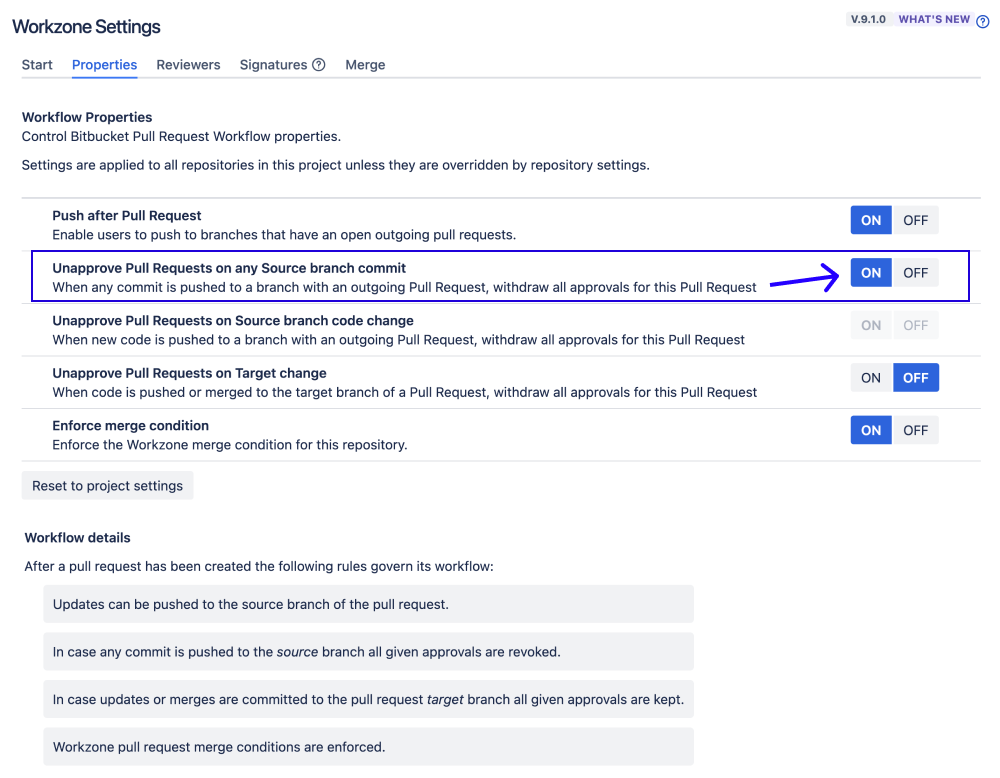
Workzone’s Unapprove Pull Requests on any Source branch commit hook revokes all existing approvals whenever a commit is added to the pull request’s source branch.
That includes changes to commit history such as rebases or squashes, even when the effective code diff has not changed.
This is useful when an organisation’s internal change-control policy says that the exact commit history being merged must have been reviewed and approved.
For example:
A pull request has two approvals. The author rebases the branch onto a newer base commit. The final code diff may be effectively unchanged, but the source branch now contains a new commit history. In strict mode, both approvals are revoked and the reviewers must approve again.
This gives teams a deliberately conservative workflow:
new source-branch commit, new approval state.
It can support audit-sensitive or regulated development processes where that is a documented technical control. It should not, however, be described as making an organisation compliant by itself.
Context-Aware Approval Mode: Speed It Up
The stricter option is not always the most efficient one.
If a pull request contains work across several modules, different reviewers may be responsible for different parts of the code. When a later update changes only one of those areas, asking every reviewer to approve everything again creates redundant review work.
Workzone’s Unapprove Pull Requests on Source branch code change hook uses its file/path reviewer configuration to revoke only the approvals that are relevant to the newly changed files.
Imagine a pull request has two reviewer groups:
| File path | Responsible reviewer group |
|---|---|
src/server/** | Backend team |
src/ui/** | UI team |
Both teams review and approve the original pull request.
The author then pushes another commit that only changes src/ui/**.
- With strict mode, both Backend and UI approvals are revoked.
- With context-aware mode, the UI reviewers must approve again, while the Backend approval remains intact because their code was not changed.
That is the key idea behind context-aware approval reset:
Ask people to re-review the code that actually changed, not code they have already reviewed and that remains untouched.
Three Approval-Reset Options in Workzone Data Center
| Workzone workflow option | Trigger | What happens to approvals? | Useful when… |
|---|---|---|---|
| Unapprove on any source branch commit | Any new source-branch commit, including a rebase with no material code change | All approvals are revoked | Your policy requires the final commit history to receive fresh approval |
| Unapprove on source branch code change | The source branch changes the pull-request code | Only approvals from matching file/path reviewers are revoked | You want targeted re-review without disturbing unrelated approvals |
| Unapprove on target change | The destination branch changes and the pull request is re-scoped | All approvals are revoked | You want reviewers to reconsider the PR after its effective comparison against the target changes |
For the source-branch approval-reset options, Workzone’s Push after pull request workflow setting must allow updates to the source branch.
The current configuration is documented in Workzone Pull Request Workflow Hooks.
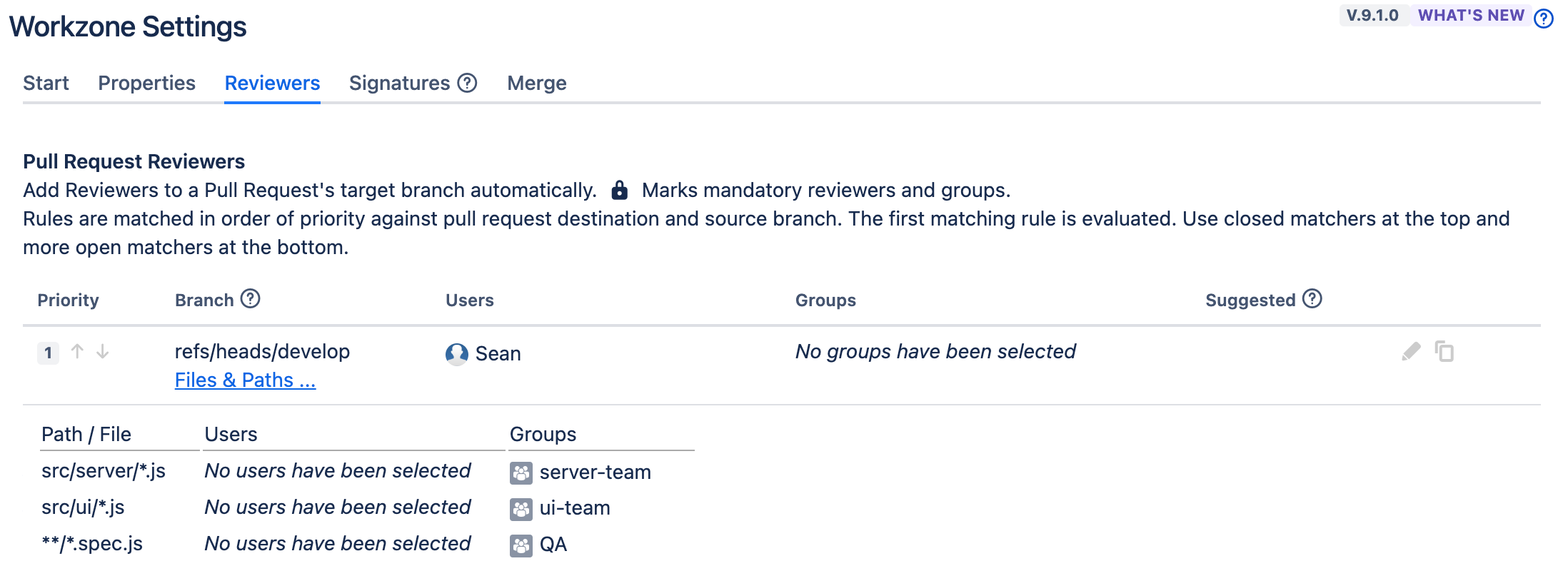
How File and Module Reviewers Make Targeted Re-Approval Possible
Context-aware approval reset depends on knowing which reviewers are responsible for which parts of the repository.
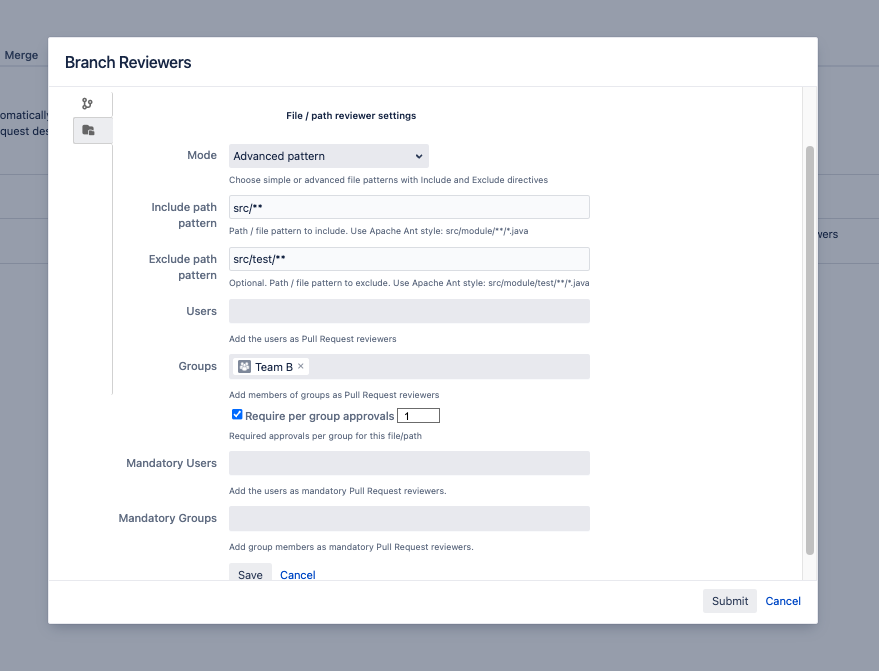
Workzone’s file and module reviewer rules can associate users or reviewer groups with include and exclude path patterns.
For example:
src/server/**→ Backend team;src/ui/**→ UI team;src/test/**→ QA team.
The same rules can also carry required approval quotas, so the workflow is not limited to deciding who gets notified. Workzone can evaluate whether the required reviewers for the changed files have actually approved before merge.
When Atlassian Auto Unapprove May Already Be Enough
You do not necessarily need Workzone for this problem.
If your policy is simply:
“When the effective pull-request diff changes, remove the existing approvals.”
Atlassian’s Auto Unapprove app may already provide the behaviour you need.
Workzone becomes more relevant when you need a different rule:
- revoke approvals after any source-branch commit, even when the effective diff does not change;
- revoke only approvals associated with the files that actually changed;
- combine approval-reset behaviour with file/path reviewers, approval quotas, mandatory reviewers, merge conditions or digital signatures.
The right choice depends on the review policy you are trying to enforce—not on using the most complicated option available.
This Is a Bitbucket Data Center Workflow
This hosting distinction is important.
Workzone’s current Cloud migration feature comparison explicitly lists Unapprove Pull Requests on Source Change and Unapprove Pull Requests on Target Change as Server/Data Center workflow hooks that are not available in Workzone Cloud.
Bitbucket Cloud has its own native approval-reset behaviour. On Premium, Atlassian can reset approvals when a pull request’s source branch is modified and optionally keep approvals when there is no change to the pull-request diff.
So do not assume that a Workzone Data Center approval-reset configuration transfers one-for-one to Cloud.
Which Approval Strategy Should You Choose?
Use the strict approach if your documented policy says a change to the source-branch commit history invalidates all existing approvals.
Use context-aware approval reset if your teams have clear file/module ownership and only the reviewers responsible for changed areas need to revisit their approval.
Use Atlassian’s simpler Auto Unapprove approach if resetting approvals after material diff changes already satisfies the requirement.
The objective is not maximum re-review. It is the right amount of re-review for the risk and policy of the change.
That is still the idea behind “play it safe or speed it up”: give a team a deliberate choice between a conservative reset policy and a more targeted review workflow rather than forcing every pull-request update through exactly the same process.
Want to Configure Approval Reset in Workzone?
See the Workzone workflow hooks documentation and the file and module reviewer guide.
For broader pull-request governance—including reviewer quotas, merge checks, independent-review controls and digital signatures—see Workzone for Bitbucket Data Center on the Atlassian Marketplace.
By Sean Manwarring, Head of Marketing at Izymes
Published 14 November 2024 · Updated 13 October 2026