

How Many Clicks Does It Take to Change a Confluence Status Macro?
How Many Clicks Does It Take to Change a Confluence Status Macro?
In our last test, changing one native Confluence Status macro from “TODO” to “IN PROGRESS” took 7 clicks and 13 keystrokes. The exact click count may differ in the current Confluence Cloud editor, but Atlassian’s current documentation still places edits to the inline Status macro inside the page editor.
By comparison, Advanced Content Status & Labels for Confluence lets users update an existing pill directly from the published page using a dropdown—without opening the page editor. In our original test, that was two clicks: open the dropdown, then choose the new value.
The supported current distinction is that the native inline Status macro is edited in the page editor, while Advanced Status Labels can be updated directly through a dropdown without opening edit mode.
Scope note: this comparison is about Confluence’s inline Status macro. It is not the same as Confluence’s page-level Content Status feature, which has a different purpose and configuration model.
Key Takeaways
- Our March 2025 test measured 7 clicks and 13 keystrokes to change one native inline Status macro from TODO to IN PROGRESS.
- Atlassian’s current documentation still describes editing an existing Status macro through the Confluence page editor.
- Advanced Content Status & Labels can update an existing pill directly from the page through a dropdown, without opening edit mode.
- The exact click count matters less than the underlying usability difference: one workflow interrupts reading with page editing; the other allows the status value to be changed in place.
- Native page-level Content Status is a separate Confluence feature and should not be confused with the inline Status macro discussed here.
Why We Counted the Clicks
I have always liked the Confluence Status macro.
It is visual, compact and easy to understand. A coloured lozenge saying TODO, IN PROGRESS or DONE can communicate something faster than another sentence of project-update text.
But a status is only useful if people keep changing it as the work changes.
That made us curious about a very simple usability question:
How much interaction does it actually take to update one inline status?
So in March 2025, we counted it.
Our March 2025 Test: 7 Clicks and 13 Keystrokes
We changed one native Confluence Status macro from TODO to IN PROGRESS.
The workflow we measured at the time was:
- Click Edit page.
- Click the Status macro.
- Click the text field containing TODO.
- Double-click/select the existing value.
- Delete the old text.
- Type IN PROGRESS.
- Select the desired colour.
- Confirm the change.
- Publish/update the page.
When we counted the individual interactions, that came to 7 clicks and 13 keystrokes.

That figure should now be treated as a dated usability measurement, not a permanent specification of Confluence.
Atlassian’s current Status macro documentation says an existing macro is changed by selecting the macro placeholder and choosing Edit, then changing its parameters in the editor.
Atlassian can—and does—change the Confluence editing experience over time.
The part that still matters is that changing the inline Status macro is an editing action on the page.
What Advanced Status Labels Changes
When we designed what became Advanced Content Status & Labels for Confluence, we approached status as a simple structured pair:
Category → Value
For example:
- Status → In Progress
- Priority → High
- Review → Awaiting Approval
For an existing pill, the value can be changed directly on the Confluence page through a dropdown.
The interaction is deliberately simple:
- Open the pill’s dropdown.
- Select the new value.
No page-editing workflow is required just to change the value.
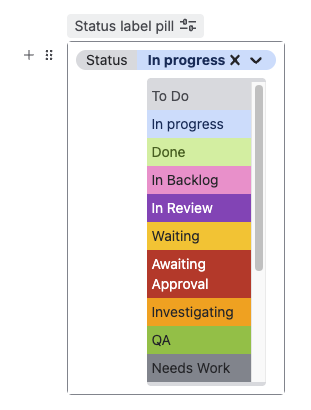
The current Marketplace listing still describes this behaviour as “Easy status updates on the fly”: values can be updated through a dropdown without page editing.
Why a Few Clicks Matter More Than They Sound
Saving a handful of clicks on one status change is not transformative by itself.
The difference appears when the action is repeated.
Imagine a project-tracking page containing 10 or 20 statuses that change frequently. If every small update requires switching into edit mode, locating the element, changing its configuration and returning to the published page, users have more reason to postpone the update.
That creates a more important problem than wasted seconds:
People stop trusting whether the status they are looking at is current.
Lower-friction updates make it easier for status information to stay alive as the underlying work changes.
This is one reason we later made easy status updates a core part of how we think about managing status labels in Confluence at scale.
The App Has Grown Beyond the Original Two-Click Idea
The original article was written when the product idea was much younger.
The basic dropdown interaction remains, but Advanced Content Status & Labels now also supports:
- custom categories and values such as Status, Priority or Department;
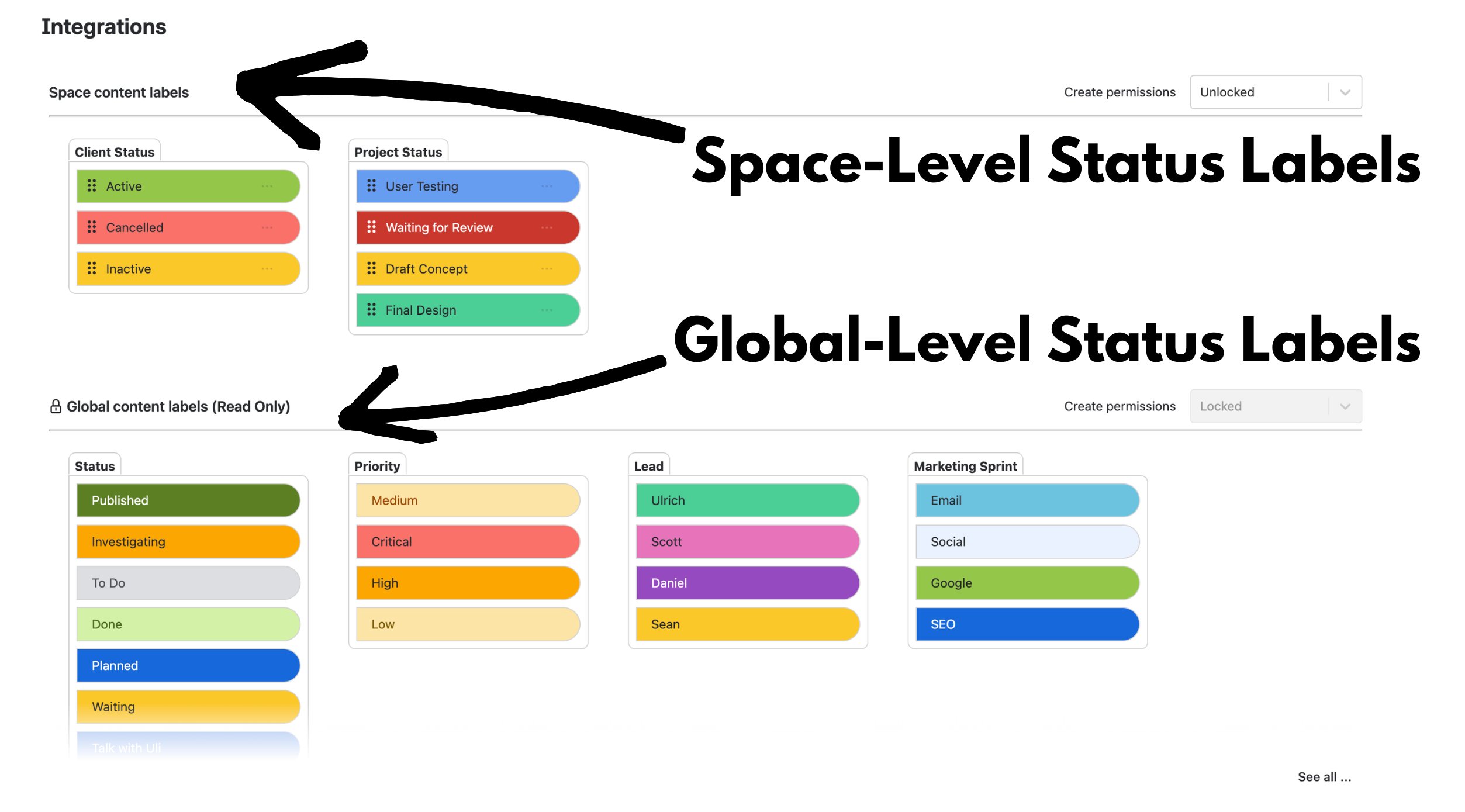
- global and space-level pill management;
- search by category and value;
- compact pills for a less visually prominent status signal;
- copy and paste for reusing status labels;
- real-time status updates for people viewing the same content.
The underlying design principle has stayed the same: status information is more useful when it is easy to update, structured consistently and reusable beyond the individual page.
Native Status Macro vs Content Status vs Advanced Status Labels
Confluence now has more than one way to communicate status, so it is important not to mix them together.
| Capability | Inline Status macro | Native Content Status | Advanced Content Status & Labels |
|---|---|---|---|
| Where it appears | Inline within page content | Page/live-doc/blog level | Inline within page content |
| How it is updated | Through the page editor | Through the native content-status control | Directly from a dropdown on the page |
| Custom text/status | Yes | Yes, subject to space configuration | Yes |
| Multiple structured categories such as Status + Priority + Department | No category/value taxonomy | No — one page-level content status | Yes |
| Shared global + local taxonomy | No | No shared site-wide category/value taxonomy | Yes |
| Structured category/value search | No equivalent | No equivalent category/value model | Yes |
If you only need one page-level lifecycle signal, native Confluence Content Status may already solve the problem.
If you specifically want a simple inline coloured lozenge whose text you edit along with the rest of the page, the native Status macro may be enough.
Advanced Content Status & Labels becomes more relevant when inline statuses need to be frequently updated, categorized, governed or searched as structured information.
So, How Many Clicks Does It Take?
The most accurate answer today is:
- Native inline Confluence Status macro: our March 2025 test measured 7 clicks and 13 keystrokes to change TODO to IN PROGRESS. The exact current count should be re-tested because Atlassian’s editor changes over time.
- Advanced Content Status & Labels: an existing pill can currently be changed directly through its dropdown without entering page edit mode; our original workflow was two clicks—open the dropdown and select the value.
The bigger lesson is not really about seven clicks versus two.
It is that frequently changing information should be easy to change.
If your team expects people to keep status information current throughout the day, reducing the friction around that interaction can make the difference between a status system people trust and one they gradually stop updating.
Want to Try the Dropdown Workflow?
See the Advanced Status Labels examples or try Advanced Content Status & Labels for Confluence on the Atlassian Marketplace.
By Sean Manwarring, Head of Marketing at Izymes
Published 18 March 2025 · Updated 13 October 2026