

Optimizing Your Pull Request Review and Merge Process: 3 Key Factors to Consider
Optimizing Your Pull Request Review and Merge Process: 3 Key Factors to Consider
Have you ever felt your pull request merge process is a bit of an old-fashioned paper trail rather than the efficient process it should be? Well, don’t just stand by and let your team suffer needlessly!
An effective Bitbucket pull request review and merge process rests on three things: the right access permissions, clear code review standards, and automated build and test checks. Set those up together and you can reduce unnecessary review work while making it clearer when a change is ready to merge.
Here are three areas worth revisiting—and where Workzone for Bitbucket can help when your team needs more granular controls.
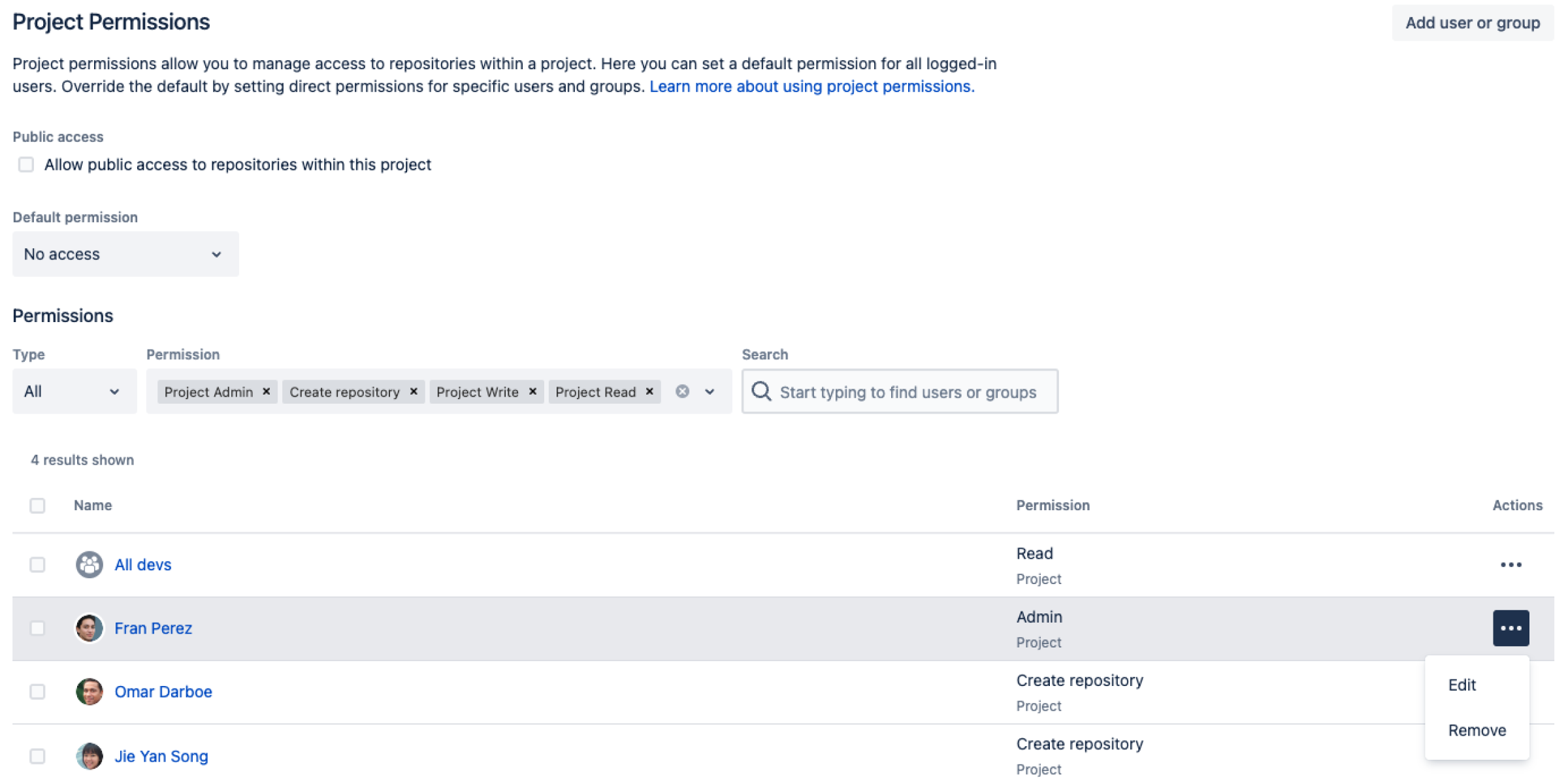
1. Permissions and access controls
Permissions are the foundation of a reliable pull request workflow. Give developers, reviewers and administrators the access they need, without granting broader privileges than their role requires.
In Bitbucket Cloud, you can grant project permissions to users and groups so that access is managed consistently across repositories. Repository access and branch restrictions then help define who can push to or merge into important branches.
For example, a developer might need permission to push to a feature branch and participate in code reviews, without having unrestricted permission to update main. Reviewers need access to inspect and discuss the code; not everyone needs administrative rights.
Treat access permissions and merge conditions as separate decisions. Being allowed to write to a repository is not the same as having satisfied the review and testing conditions for a particular pull request.
2. Set up code review guidelines and standards
Even efficient teams sometimes struggle to follow review standards consistently. The trick is to make the expectations clear and automate the repetitive parts:
- Invite the right people. Choose reviewers who understand the changed code instead of notifying everyone. Native Bitbucket default reviewers and CODEOWNERS can automatically add reviewers, including groups or teams, based on repository rules and changed file paths.
- Agree on approval requirements. Decide how many approvals are useful for routine changes, and which sensitive areas need review from a particular specialist or team.
- Use a consistent PR description or checklist. Include the purpose of the change, relevant Jira work, test results and any security, performance or maintainability concerns. Bitbucket Cloud supports default pull request descriptions and repository-based PR templates.
- Make feedback actionable. Clarify how reviewers should request changes, how tasks are resolved and when a changed PR needs another review.
- Review the rules periodically. Remove approvals that add little value and strengthen checks where the code’s risk warrants it.
For many teams, native Bitbucket is enough. But adding someone as a reviewer is different from requiring a specific approval from that person’s team.
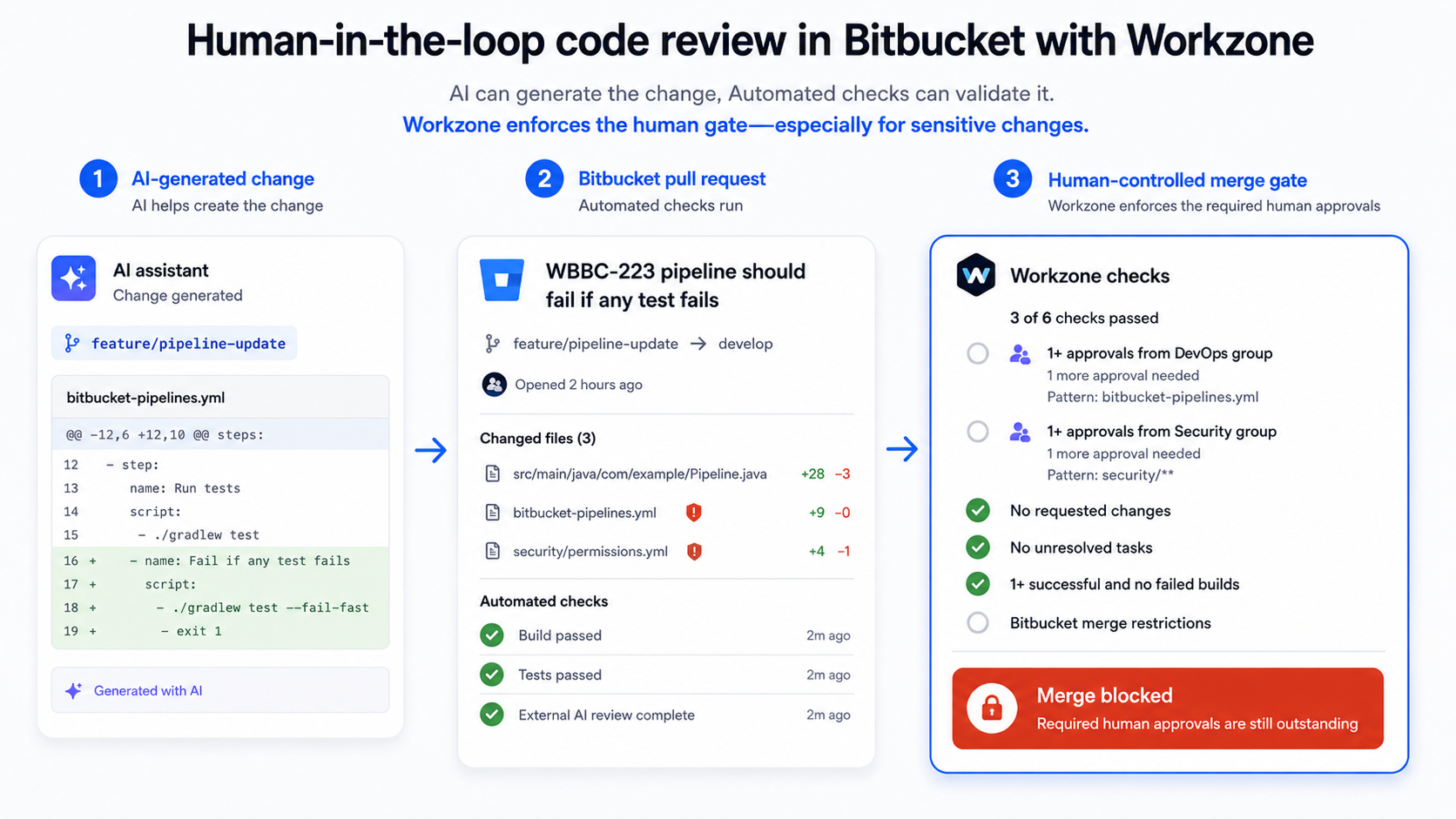
That is where Workzone Cloud can add value: reviewer and approval rules can match source/destination branches and file patterns, assign users or groups, and set an approval quota for each rule.
For example, changes to src/payments/** could require two eligible approvals from the payments team, rather than simply two approvals from anyone on the PR. Workzone can also be configured not to count approvals from people who contributed commits to that pull request.
Workzone configuration can be shared at workspace or project level, with repositories inheriting the relevant rules or using their own configuration. This reduces repetition without requiring every repository to have identical review policies. See the Workzone Cloud setup guide for the inheritance and override behaviour.
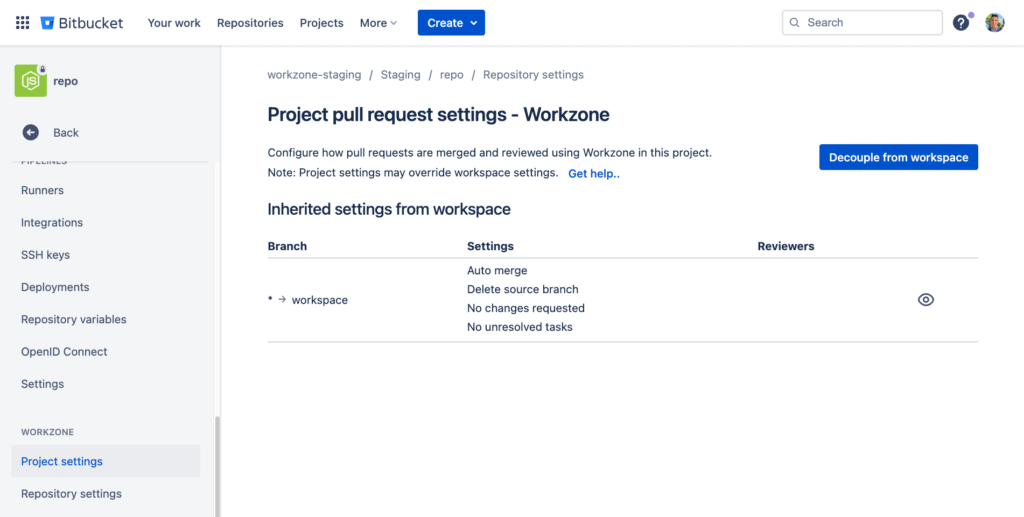
3. Automated testing and continuous integration
Automated testing and continuous integration (CI) help catch problems before changes reach a shared branch. At a minimum, choose the build, unit-test, formatting or other checks that provide meaningful feedback for your project.
Then make the build status visible on the pull request and decide which checks must pass before merge.
Bitbucket Cloud already has native merge checks for conditions such as approvals, unresolved tasks, requested changes and successful builds. On Bitbucket Premium, supported native merge checks can be enforced to block merging; on other Cloud plans, unresolved checks generally generate warnings rather than a blocking requirement. See Atlassian’s merge-check guidance.
Workzone does not run the tests for you. It can use CI results and its configured reviewer rules as part of its own merge conditions, including required successful builds, group approval quotas and no unresolved tasks.
One important setup detail: to enforce the Workzone-controlled merge process, configure appropriate Bitbucket branch restrictions as well so users cannot simply bypass the intended Workzone merge path.
Installing the app or adding review rules alone is not the complete enforcement setup. The Workzone Cloud setup guide explains that requirement.
A passing build is not proof that a change is secure or well designed, and PR checks are not the same as deploying code. The aim is to use automation for objective checks while reviewers assess the decisions automated tests cannot fully evaluate.
Bring the three factors together
A strong workflow combines all three: only authorised people can update protected branches; the appropriate reviewers approve the code; and the agreed automated checks pass before merge.
Start with the controls native Bitbucket already provides. Add Workzone when you need more precise file- or group-specific approvals, independent-review requirements, or reusable review and merge policies across repositories.
The right process is the one your team can follow consistently—not the one with the most rules.
For a broader explanation of when to introduce these policies, see Why You Should Define Your Pull Request Workflow Early in Agile Projects.
Ready to make your Bitbucket review and merge process more consistent?
If your team has outgrown a simple reviewer list, explore Workzone for Bitbucket on the Atlassian Marketplace. See how file-specific reviewers, group approval quotas and configurable merge conditions can help turn your code review standards into a repeatable workflow.
By Sean Manwarring, Head of Marketing at Izymes
Published 31 January 2023 · Updated 26 October 2026


Pingback: Git Pre-Commit vs Pre-Receive Hooks: Setup & Tips | Izymes
October 26, 2026