

Workzone vs Bitbucket CODEOWNERS: When Do You Need More Than Code Ownership?
Workzone vs Bitbucket CODEOWNERS: When Do You Need More Than Code Ownership?
If you only need file- or path-based reviewer assignment in Bitbucket Cloud, native CODEOWNERS may already be enough. Workzone becomes useful when you need reviewer assignment to become an enforceable approval policy—for example, requiring a specific number of approvals from the team responsible for a sensitive file path, preventing committer approvals from satisfying the quota, delaying reviewer assignment until a build passes, or requiring signed approvals.
That is the most important distinction in the Workzone vs Bitbucket CODEOWNERS comparison: CODEOWNERS is primarily an ownership and reviewer-assignment mechanism; Workzone adds a broader pull-request governance layer.
Bitbucket Cloud CODEOWNERS is configured in .bitbucket/CODEOWNERS and can map changed paths to individual users, workspace groups or repository-managed teams. Workzone uses branch and file/module reviewer rules that can also carry explicit approval requirements and merge conditions.
Key Takeaways
- Use native CODEOWNERS first if your main requirement is automatically adding the right reviewers when particular files change.
- Modern Bitbucket CODEOWNERS supports individuals, workspace groups and repository-managed teams, including
all,randomandleast_busyreviewer-selection strategies. - CODEOWNERS itself does not make the matched owner a path-specific mandatory approver or attach an approval quota to that ownership rule.
- Workzone can combine file/module reviewer rules with approval quotas, mandatory reviewers, successful-build conditions, independent-review logic and digital signatures.
- Bitbucket Premium can enforce native Bitbucket merge checks, so teams should compare Workzone against the native controls they already have rather than against CODEOWNERS in isolation.
What Bitbucket CODEOWNERS Does Well
Bitbucket Cloud’s native CODEOWNERS feature is more capable than some older comparisons suggest.
A CODEOWNERS file can map repository paths to:
- individual users;
- workspace groups;
- repository-managed teams defined alongside the CODEOWNERS file.
For groups and teams, Bitbucket also supports reviewer-selection strategies including:
all— add every member;random(N)— choose a specified number of reviewers at random;least_busy(N)— choose reviewers based on their current review load.
That makes CODEOWNERS a strong native option when the requirement is:
“When this part of the repository changes, automatically request review from the appropriate owner or team.”
If that solves the actual problem, there may be no reason to add another app.
Where CODEOWNERS Stops and Workzone Starts
The difference becomes more important when ownership is not enough.
Imagine that changes under src/auth/** should not merely request review from the security team. Your policy might say:
“At least two eligible security reviewers must approve this change before it can merge.”
CODEOWNERS can identify and request the relevant reviewers, but the CODEOWNERS rule itself does not carry that path-specific approval quota.
With Workzone reviewer and approval configuration, the file/module pattern, reviewers or reviewer group, and approval quota can form one rule.
For example:
| Changed path | Reviewer rule | Required Workzone approval policy |
|---|---|---|
src/ui/** | UI team | 1 approval |
src/main/** | Backend team | 2 approvals |
src/auth/** | Security reviewers | 2 eligible approvals |
This is where Workzone changes the question from “who owns this code?” to “what review policy must this code satisfy before merge?”
Workzone vs Bitbucket CODEOWNERS: Current Feature Comparison
| Requirement | Bitbucket Cloud CODEOWNERS | Workzone Cloud |
|---|---|---|
| File/path-based reviewer assignment | Yes | Yes |
| Individuals as reviewers | Yes | Yes |
| Groups / teams | Yes — workspace groups and repository-managed teams | Yes |
| Reviewer selection based on workload or random selection | Yes — all, random, least_busy | Different reviewer-rule model rather than CODEOWNERS selection strategies |
| Explicit approval quota tied to the matching file/path rule | No — not part of CODEOWNERS itself | Yes |
| Mandatory reviewer/group behaviour | CODEOWNERS requests reviewers; it does not itself create a Workzone-style mandatory approval rule | Yes |
| Add reviewers only after a successful build | No CODEOWNERS equivalent | Yes |
| Exclude approvals from users who contributed commits when calculating the app quota | No CODEOWNERS equivalent | Yes |
| Digitally signed pull-request approvals | No native CODEOWNERS equivalent | Yes |
| Configuration scope | Repository configuration | Workspace, project and repository |
| Configuration model | Configuration-as-code in .bitbucket/CODEOWNERS | Web UI, REST API and JSON |
For the full maintained feature matrix, see the Workzone Cloud vs Bitbucket Cloud CODEOWNERS documentation.
Do Not Compare CODEOWNERS in Isolation From Bitbucket Merge Checks
CODEOWNERS is only one part of Bitbucket’s native pull-request workflow.
Bitbucket Cloud also provides merge checks for conditions such as:
- minimum approvals;
- minimum approvals from default reviewers;
- successful builds;
- no requested changes;
- no unresolved pull-request tasks.
On non-Premium plans, unresolved native merge checks can warn users but do not prevent the merge. Bitbucket Premium can make those checks blocking.
That means the fair comparison is not:
“Can CODEOWNERS enforce any review policy?”
It is:
“Can native CODEOWNERS plus Bitbucket’s merge checks express and enforce the policy we actually need?”
For many teams, the answer will be yes.
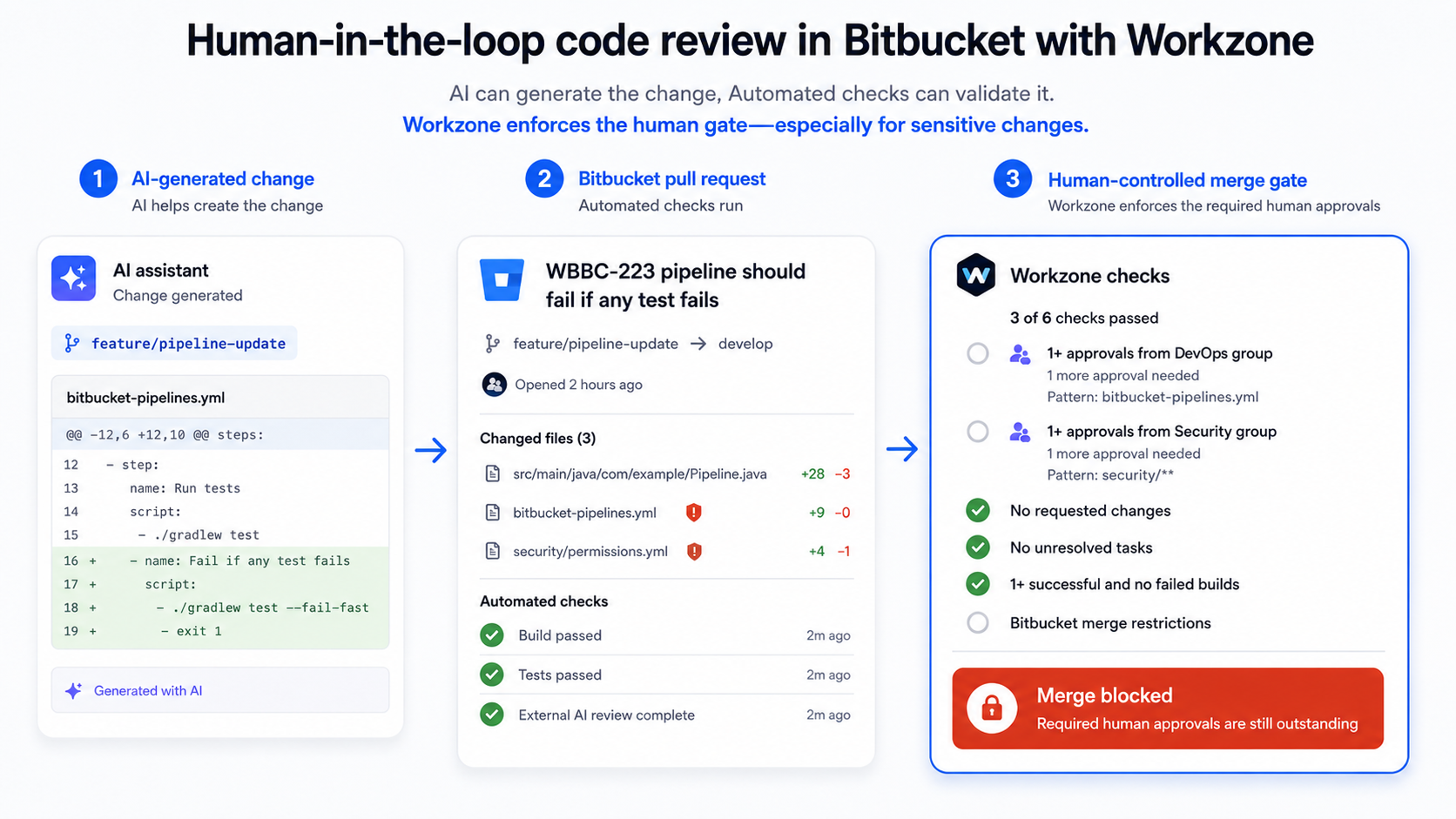
Workzone becomes more relevant when the approval policy needs to follow the particular branch, file/module rule or reviewer group involved in the change, or when the team wants Workzone’s additional automation and approval controls while remaining on Bitbucket Standard.
Additional Workzone Controls That Matter in Higher-Governance Workflows
Independent Review
Workzone can be configured to ignore approvals from committers when calculating an approval quota.
The approval remains visible in Bitbucket, but if that reviewer has contributed commits to the pull request, Workzone does not count it toward the configured quota.
This is useful when a process distinguishes between an approval and an independent approval.
Review Only After the Build Is Ready
A Workzone reviewer rule can be configured so reviewers are added only after a successful build has been detected.
For teams with expensive or limited review capacity, that can avoid pulling human reviewers into changes that have not yet passed a basic automated gate.
Digital Signatures
Where a process requires stronger approval evidence, Workzone digital signatures can require signed pull-request approvals and record signing information with the approval.
This can support audit-sensitive software change-control workflows, but it should not be described as making an organisation compliant by itself.
Mandatory Reviewer Author Bypass
There is also a newer edge case Workzone now handles: if the pull-request author is themselves a mandatory reviewer for a matching file/path rule, they cannot approve their own pull request and can create a reviewer deadlock.
Workzone’s optional Author bypass setting can treat that specific mandatory-user requirement as satisfied for the author while leaving the other reviewer and group requirements in place. The setting is off by default and applies only to the relevant file/path rule.
Configuration Governance: CODEOWNERS Is Not Simply “Editable by Everyone”
Older versions of this comparison described CODEOWNERS as something “everyone can edit”. That is too simplistic.
The CODEOWNERS file lives in the repository, so changes to it follow the repository’s normal write-access and branch-governance model. Teams can protect that configuration using appropriate Bitbucket permissions and pull-request practices.
Workzone uses a different model: settings are managed through its workspace, project or repository configuration by the relevant administrators.
The real difference is therefore:
- CODEOWNERS: repository-based configuration-as-code;
- Workzone: centrally administered workflow configuration with workspace/project/repository scopes.
Neither model is automatically better. Some engineering teams strongly prefer configuration-as-code; others want workflow administrators to manage review policy outside the source repository.
When Bitbucket CODEOWNERS Is Enough
You may not need Workzone if:
- your main requirement is automatically assigning appropriate reviewers based on changed paths;
- Bitbucket’s group/team selection strategies already handle the way you distribute reviews;
- a general minimum approval requirement is enough;
- native Bitbucket merge checks provide the level of enforcement you need;
- you prefer repository-managed configuration-as-code.
In that situation, use the native feature and keep the workflow simple.
When to Consider Workzone as a Bitbucket CODEOWNERS Alternative
Workzone is more relevant when you need combinations such as:
- a different approval quota for different file or module patterns;
- mandatory users or reviewer groups;
- independent-review rules that exclude committer approvals from the quota;
- reviewers added only after a build succeeds;
- digitally signed approvals;
- workspace- or project-level policy that can be reused across repositories;
- Workzone-controlled merge conditions and automation without upgrading the entire workspace solely for native Premium merge enforcement.
When Workzone is being used to enforce the merge path, Izymes recommends configuring Bitbucket branch restrictions so normal users cannot bypass the intended Workzone merge process.
Bottom Line
Bitbucket CODEOWNERS is a useful native feature and is often the right starting point.
If the requirement is simply:
“Automatically request review from the owners of the code that changed.”
start with CODEOWNERS.
If the requirement is:
“This particular code area must satisfy this particular reviewer and approval policy before it can merge.”
that is where Workzone’s more granular governance model becomes relevant.
For the detailed technical matrix, see Workzone Cloud vs Bitbucket Cloud CODEOWNERS. If cost is part of the decision, see our separate Workzone + Bitbucket Standard vs Bitbucket Premium cost comparison.
Want to Test Workzone Against Your Current CODEOWNERS Setup?
Review the Workzone reviewer and approval configuration or try Workzone for Bitbucket Cloud.
By Sean Manwarring, Head of Marketing at Izymes
Published 23 July 2025 · Updated 13 October 2026

Pingback: Optimize Your Bitbucket Code Review Workflow | Izymes
October 13, 2026